

|

|

|
Web Security Deployment Recommendations > Deploying Web Security core components
|

|

|
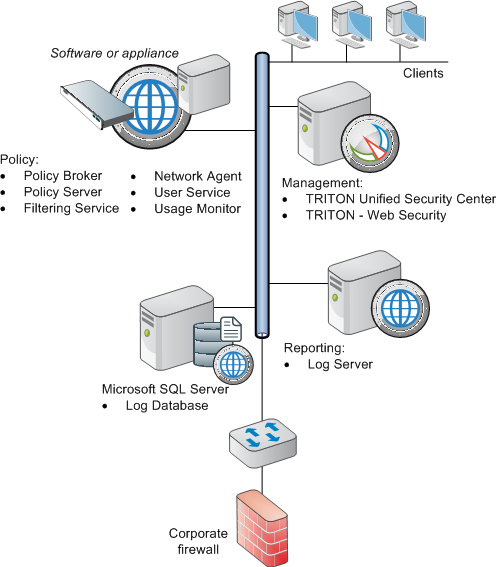
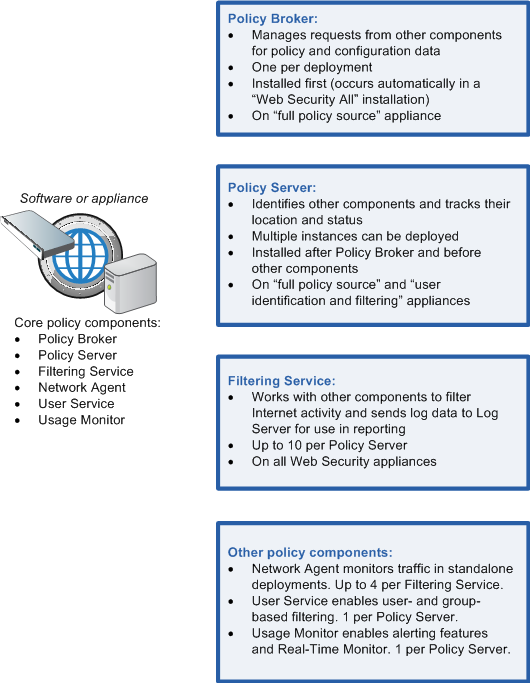
With Websense appliances, Policy Broker is present on the full policy source appliance only.
|
|
|
Most components must be able to communicate with Policy Broker on port 55880. (The exceptions are all optional components: transparent identification agents, State Server, Multiplexer, Linking Service, and Directory Agent.)
|
|
|
With Websense appliances, Policy Server is present on the full policy source appliance.
|
|
|
Additional instances of Policy Server can be deployed on Windows or Linux machines, or on user identification and filtering appliances.
|
|
|
Most components must be able to communicate with Policy Server on ports 55806 and 40000. (The exceptions are Remote Filtering Server and State Server.)
|
|
|
With Websense appliances, a Filtering Service instance is present on the full policy source appliance.
|
|
|
Additional instances of Filtering Service can be deployed on Windows or Linux machines, or on either user identification and filtering (includes Policy Server) or filtering only (must point to a remote Policy Server) appliances.
|
|
|
|
|
|
|
Web Security Deployment Recommendations > Deploying Web Security core components
|